
Typing is an important skill for students, professionals, business owners, and anyone who regularly uses a computer. From writing emails to preparing documents, efficient keyboard use makes everyday digital activities easier. However, developing good typing habits requires more than simply pressing keys quickly. Users must also understand finger positioning, maintain accuracy, and practise consistently. A Finger Typing Test provides a practical way to evaluate these abilities and identify areas that need improvement. With regular practice through FastFingers, learners can develop better coordination, improve their performance, and become more comfortable using a keyboard.
Why Finger Placement Matters When Typing
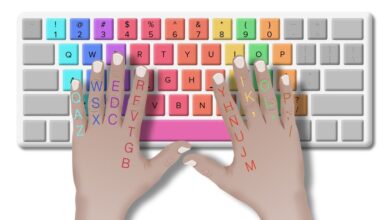
Correct finger placement creates a foundation for comfortable and efficient typing. When users place their fingers correctly, they can reach different keys without making unnecessary hand movements. This approach also helps develop muscle memory over time.
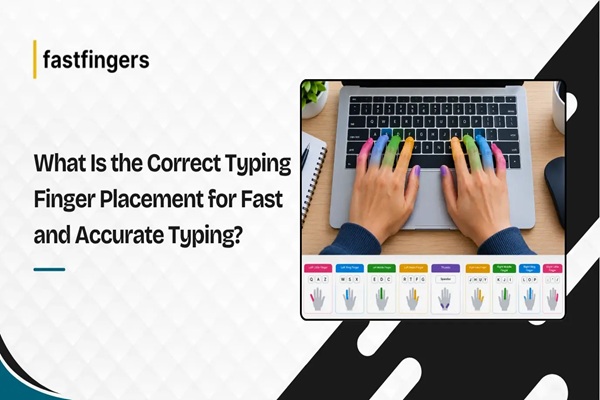
The home row is the starting position for touch typing. On a standard keyboard, the left-hand fingers rest on A, S, D, and F, while the right-hand fingers rest on J, K, L, and the semicolon key.
Practising these positions during a Finger Typing Test helps beginners understand how each finger contributes to keyboard movement. As familiarity increases, typing becomes smoother and more consistent.
How a Finger Typing Test Measures Performance
Online typing tests evaluate how accurately and quickly someone enters displayed text. Usually, users receive a passage or collection of words and must reproduce it within a selected time limit.
The platform then calculates different performance measurements. These commonly include words per minute, typing accuracy, and the number of incorrect characters.
A Finger Typing Test makes it easier to understand current typing abilities instead of relying on assumptions. Users can compare results from different sessions and identify whether their performance is improving.
Furthermore, reviewing mistakes helps learners understand which letters, combinations, or punctuation marks require additional attention.
Benefits of Regular Finger Typing Practice
Consistent typing practice offers several advantages for everyday computer users. It improves coordination between the eyes, fingers, and brain while helping individuals become familiar with keyboard layouts.
Some important benefits include:
- Better typing accuracy through repeated exercises.
- Improved finger coordination and movement.
- Greater confidence when using a computer.
- Reduced dependence on looking at keyboard keys.
- More efficient completion of writing-related tasks.
A Finger Typing Test also encourages learners to establish measurable goals. Instead of practising without direction, they can focus on improving specific aspects of their performance.
Finger Typing Test Techniques for Beginners
Beginners should develop correct habits before attempting to achieve extremely high typing speeds. Rushing through exercises can increase mistakes and make it difficult to maintain proper finger positioning.
Start by learning the home row keys and understanding which fingers should reach particular sections of the keyboard. Practise simple words before moving towards complete sentences and longer passages.
During a Finger Typing Test, maintain a comfortable sitting position and keep your hands relaxed. Avoid unnecessary pressure on the keyboard because gentle movements can support better control.
Additionally, practise without looking down at your fingers whenever possible. Although this may feel challenging initially, regular repetition gradually improves familiarity with key locations.
Practical Ways to Increase Typing Speed
Improving typing speed requires a combination of consistency, concentration, and correct technique. Fortunately, learners can follow several simple strategies to develop their abilities.
Practise Daily: Set aside 10 to 20 minutes for typing exercises. Short, consistent sessions often make learning easier to maintain.
Prioritise Accuracy: Focus on entering the correct characters instead of chasing a high speed score. Accuracy creates a stronger foundation for faster typing.
Use All Fingers: Distribute keyboard movements between both hands. This reduces unnecessary movement and improves typing efficiency.
Try Different Exercises: Practise words, sentences, paragraphs, and numbers to develop flexibility.
Track Your Progress: Record your results and compare them regularly. This helps identify improvements and areas that need attention.
By applying these methods during a Finger Typing Test, learners can gradually improve their overall keyboard performance.
Common Mistakes That Affect Typing Accuracy
Many people develop habits that prevent them from reaching their full typing potential. One frequent mistake is using only two fingers. Although this method may work for short messages, it often limits speed and creates unnecessary movement.
Another problem is looking at the keyboard after every few characters. This interrupts concentration and reduces typing rhythm.
Some learners also press keys too forcefully or ignore punctuation while practising. These habits can affect accuracy and comfort.
A Finger Typing Test helps identify repeated errors. Once users understand their weaknesses, they can practise specific combinations and improve their technique gradually.
How FastFingers Supports Typing Improvement
Finding a convenient way to practise makes learning more manageable. FastFingers focuses on developing typing abilities through accessible online practice and performance measurement.
Users can approach their learning with clear objectives, whether they want to improve accuracy, develop better finger coordination, or become more comfortable with timed typing activities.
A Finger Typing Test can become part of a regular learning routine. By checking results after each session, learners can understand their progress and adjust their practice accordingly.
The most effective approach is to remain consistent rather than expecting immediate results.
Who Should Take Online Finger Typing Tests?
Typing exercises can benefit people across different age groups and professional backgrounds. Students can improve their ability to complete assignments, while office employees can become more efficient when preparing reports and handling digital records.
Job seekers may also find typing practice useful when preparing for computer-based recruitment assessments. Similarly, freelancers, writers, and data entry professionals can strengthen an important workplace skill.
Even casual computer users can benefit from improved keyboard familiarity because typing is involved in countless everyday activities.
Typing Test Fast Fingers for Consistent Learning
For individuals who want another approach to developing keyboard confidence, Typing Test Fast Fingers can provide a useful practice topic. Learners can concentrate on correct finger placement, controlled movements, and accuracy while becoming familiar with different keyboard exercises. Regular practice helps reinforce useful habits and encourages gradual improvement. Rather than comparing every result with others, individuals should evaluate their own progress and focus on developing comfortable, reliable typing techniques.
Conclusion
Strong typing skills develop through patience, correct finger placement, and regular practice. Improving accuracy before increasing speed helps learners establish a reliable foundation for everyday computer activities. A Finger Typing Test offers a practical method to measure performance, recognise mistakes, and set achievable goals. With FastFingers, users can make typing practice part of their regular learning routine. Start with simple exercises, maintain proper positioning, and gradually challenge yourself to achieve better speed, accuracy, and confidence.